


Buy VIN Programmed Sync 3 Unit: Complete Buyer's Guide
Table of Contents
- What Is a VIN-Programmed Sync 3 APIM?
- Benefits of VIN Programming for Sync 3 Modules
- Sync 2 to Sync 3 Upgrade Requirements
- Sync 3 APIM Replacement vs. Full System Upgrade
- Troubleshooting Sync 3 Boot Loop Issues
- VIN-Programmed SYNC 3 APIM Options
- Plug-and-Play Installation and What to Expect
- Frequently Asked Questions
Last Updated: September 23, 2026
What Is a VIN-Programmed Sync 3 APIM?
When you buy a VIN-programmed SYNC 3 APIM from All Things Sync, we select a compatible genuine OEM Ford APIM for your vehicle and configure it using your vehicle information before shipment. The APIM (Accessory Protocol Interface Module) is a core module behind the SYNC 3 infotainment system. Hardware selection and APIM configuration are related but separate steps: we choose a compatible APIM for your application, then configure it to your vehicle, reducing the configuration work normally needed for a supported install.

At All Things Sync, we've specialized in VIN-programmed Sync 3 modules since 2019. Every module we ship is professionally tested and configured to your exact vehicle specifications. Proper vehicle-specific configuration helps the replacement APIM work with supported factory features such as the backup camera, steering-wheel controls, climate integration, parking features, and factory audio controls, depending on the vehicle and equipment.
The key difference between a standard APIM and a VIN-programmed one is the setup work. An unconfigured replacement APIM typically needs vehicle-specific configuration before it will work correctly, often done through dealer programming. A VIN-programmed unit from All Things Sync arrives configured for your vehicle. For an APIM-only replacement in a compatible factory SYNC 3 system, the existing touchscreen and other compatible factory hardware can remain in place. No cutting. No splicing.
Benefits of VIN Programming for Sync 3 Modules
VIN programming reduces the configuration work that normally falls on the vehicle owner or technician. Without it, an unconfigured replacement APIM may need extra vehicle-specific configuration after installation, which some installers handle with tools like FORScan and an OBD2 adapter. With the APIM already configured for your vehicle, installation is more straightforward.
The practical benefits stack up quickly. First, you skip the technical complexity. Incorrect configurations can create compatibility issues or disable features. A pre-programmed module reduces configuration work. Second, proper configuration helps retain supported factory features. The APIM communicates with your vehicle's other modules to preserve backup camera functionality, steering wheel controls, and climate integration.
Hardware selection and VIN programming are related but separate steps. All Things Sync selects a compatible APIM for your vehicle and application, then configures it to your vehicle before shipping, removing the guesswork of matching the right module to your vehicle.
Sync 2 to Sync 3 Upgrade Requirements
Upgrading from Sync 2 to Sync 3 requires more than swapping the APIM. Sync 2 and Sync 3 use different hardware architectures, so a conversion generally needs the appropriate Sync 3 hardware and vehicle-specific components, not just a replacement APIM.
Your vehicle must have the factory 8-inch Sync 2 touchscreen with MyFord Touch to use the standard 8-inch Sync 3 conversion. If you have the older factory 4-inch display, you'll need a vehicle-specific 4-inch-to-8-inch conversion kit rather than the standard 8-inch conversion.
The Sync 2 to Sync 3 upgrade kit from All Things Sync is available with or without built-in Ford factory navigation. See the product page for current pricing and available options. The kit arrives with the APIM configured to your vehicle, along with the necessary cables and adapters.
Component |
Sync 2 System |
Sync 3 Upgrade |
Notes |
|---|---|---|---|
APIM Module |
Older generation |
Compatible Sync 3 APIM |
Configured to your vehicle before shipping |
Touchscreen |
8-inch MyFord Touch |
8-inch Sync 3 capacitive |
Included in the conversion kit |
USB Hub |
Original (may not support CarPlay) |
Upgraded (supports both CarPlay and Android Auto) |
Required for modern connectivity |
Navigation |
Optional |
Optional |
See product page for current pricing and coverage details |
Installation |
Plug-and-play |
Plug-and-play |
No cutting or splicing required |
Sync 3 APIM Replacement vs. Full System Upgrade
If your vehicle already has factory Sync 3 and the APIM has been determined faulty, you may not need a full system upgrade. Replacing the APIM can let you keep your existing compatible touchscreen and other supported hardware. See the Sync 3 APIM replacement product page for current pricing and available options.
A full system upgrade makes sense when you're converting from Sync 2 or when you want to add factory navigation to a non-navigation Sync 3 system. The upgrade kits include everything needed for a complete transition. If your vehicle has factory Sync 2 or MyFord Touch, converting to Sync 3 needs a full conversion, not just an APIM replacement. If you're seeing a black screen, reboot, freeze, or other problem and haven't diagnosed the cause yet, troubleshoot before assuming the APIM needs replacing. See Ford SYNC 3 APIM Failure Symptoms: How to Tell If Your APIM Is Bad or Ford SYNC 3 Black Screen: APIM or Screen? for help identifying the cause.
Choose an upgrade kit if you're moving from Sync 2 or adding navigation capability. All Things Sync offers multiple APIM replacement options, including a standard non-navigation version, a navigation-equipped version, and a Gen 4 navigation APIM. See the Sync 3 APIM replacement product page for current pricing and available options.
FORD & LINCOLN SYNC 3 APIM REPLACEMENT →
Troubleshooting Sync 3 Boot Loop Issues
A Sync 3 system stuck on the Ford or Lincoln startup logo is experiencing a boot loop. Incorrect configuration, connection issues, or a hardware problem can potentially contribute, but a boot loop alone doesn't identify the cause. When you buy a VIN-programmed Sync 3 unit from All Things Sync, we configure the APIM for your specific vehicle before shipment, which reduces the configuration work normally needed for a supported install.
If the problem begins after installation, verify that all connectors are fully seated before continuing troubleshooting. For more on identifying the cause of Sync 3 problems, see Ford SYNC 3 APIM Failure Symptoms: How to Tell If Your APIM Is Bad.
If the problem persists after checking the installation, additional troubleshooting may be needed to determine whether the APIM or another part of the system is causing the issue. Replacement APIM modules from All Things Sync include a 1-year warranty. If yours fails within the warranty period, contact All Things Sync for a replacement.
VIN-Programmed SYNC 3 APIM Options
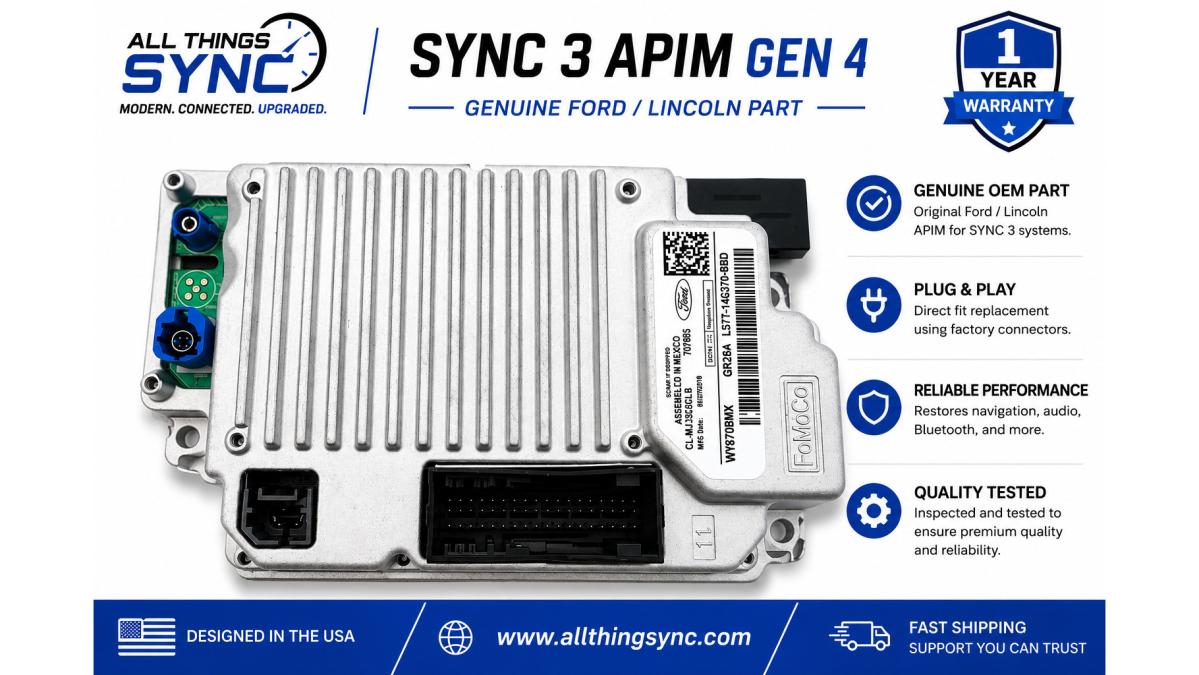
All Things Sync offers VIN-programmed Sync 3 modules to match different needs and budgets. For a vehicle with a diagnosed APIM failure, the standard non-navigation APIM replacement provides a replacement for the existing module without adding built-in Ford navigation. See the Sync 3 APIM replacement product page for current pricing and available options.
The navigation-equipped APIM adds built-in Ford factory navigation. See the product page for current pricing and coverage details.

Product |
Price |
Best For |
Navigation |
Key Feature |
|---|---|---|---|---|
Sync 3 APIM Replacement |
See product page |
Replacing failed APIM |
No |
Plug-and-play, retains existing screen |
Sync 3 APIM with Navigation |
See product page |
Adding or retaining factory nav |
Yes |
Built-in GPS maps included |
Gen 4 APIM with Navigation |
See product page |
Applications needing Gen 4 hardware |
Yes |
Latest hardware generation |
Sync 2 to Sync 3 Upgrade |
See product page |
Converting from Sync 2 |
No |
Complete kit, no cutting required |
Sync 2 to Sync 3 with Navigation |
See product page |
Sync 2 conversion with nav |
Yes |
Factory navigation included |
Mustang 4-to-8 Conversion |
See product page |
Mustang owners |
Optional |
Custom Mustang wiring harness |
F-150 / Super Duty 4-to-8 |
See product page |
Truck owners |
Optional |
Custom truck wiring harness |
Plug-and-Play Installation and What to Expect
Many vehicle owners successfully complete these installations themselves. All Things Sync provides detailed instructions and is available to answer questions during the process. If you're uncomfortable working with vehicle electronics, a qualified installer familiar with Ford and Lincoln infotainment systems can handle the installation.
Frequently Asked Questions
Does a Sync 3 unit need to be programmed to my specific VIN?
Yes. A Sync 3 APIM must be programmed to your vehicle's VIN and factory configuration to communicate properly with your vehicle's other modules and retain factory features like backup camera, steering-wheel controls, and climate controls. A VIN-programmed unit arrives ready to install with no dealer programming normally required. Without VIN programming, the module may not function correctly or could cause compatibility errors.
What happens if I install a Sync 3 unit without VIN programming?
An APIM that has not been properly configured for the vehicle may have incorrect or missing functionality and may require additional configuration before all supported features operate correctly. A VIN-programmed APIM from All Things Sync arrives configured for your specific vehicle before shipment, reducing the configuration work required after installation.
How much does it cost to replace the APIM in a Sync 3 system?
VIN-programmed Sync 3 APIM replacements start at $349 for a non-navigation module and range up to $499 for Gen 4 hardware with built-in factory navigation. A complete Sync 2 to Sync 3 upgrade kit runs $599 to $699 depending on navigation inclusion. Prices vary based on hardware generation, navigation capability, and vehicle compatibility. All units include 1-year warranty and U.S.-based support.
What are the benefits of buying a pre-programmed Sync 3 APIM?
Pre-programmed APIMs reduce installation complexity, reduce dealer programming costs, and ensure compatibility with your specific vehicle. You receive a module tested and configured before shipment, making the swap straightforward: remove the old module, install the replacement, and reconnect factory connectors. This approach saves time and reduces the risk of incorrect configuration that could require additional troubleshooting.