


Ford SYNC 3 Black Screen: APIM or Screen?
Table of Contents
- APIM vs Screen: What Each Component Actually Does
- Why Is My SYNC 3 Screen Black? Common Scenarios Explained
- How to Reset SYNC 3 System Before Replacing Parts
- Troubleshooting SYNC 3 Power Issues: Fuses, Voltage, and Connections
- Ford SYNC 3 Diagnostic Procedures: Building a Decision Tree
- Repair or Replace? What to Do Next
- Frequently Asked Questions
Last Updated: September 21, 2026
APIM vs Screen: What Each Component Actually Does
A Ford SYNC 3 black screen is a symptom, not a diagnosis. The blank display you're staring at can come from the APIM, the touchscreen assembly, a power or fuse problem, a wiring fault, or a software glitch, and treating it as an automatic APIM failure is how owners end up buying parts they didn't need. At All Things Sync, we understand that the first step is understanding what each component actually does.
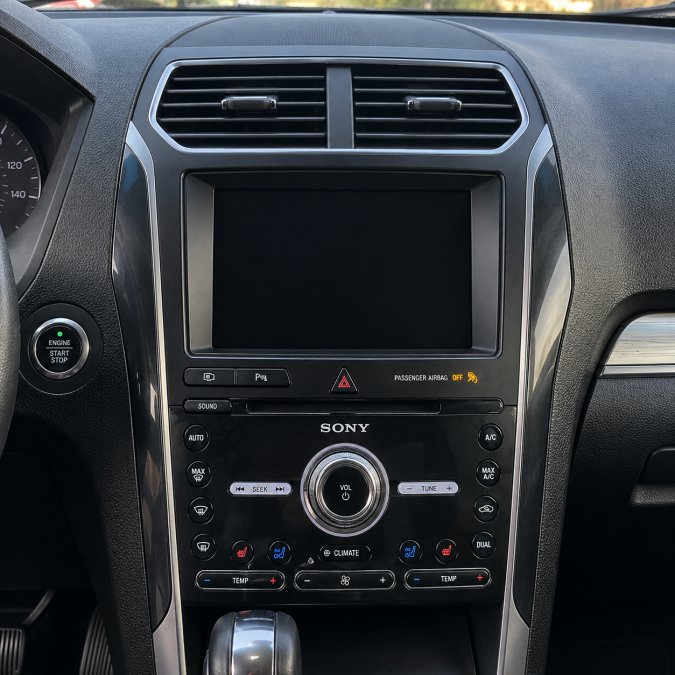
Why Is My SYNC 3 Screen Black? Common Scenarios Explained
A black SYNC 3 screen can present in several distinct ways, and each pattern points toward a different part of the system. Matching your symptom to the right scenario narrows the search before you touch a tool.
- Completely black screen, no response to touch: could be the APIM, the display, power delivery, or a connection fault.
- Black screen but AM/FM/SiriusXM audio still works: the ACM handles much of the radio and audio function independently, so audio can survive an APIM-related problem. Working radio does not prove the APIM is healthy.
- Screen intermittently turns on and off: This is commonly a sign of a failing screen/display, especially if the rest of the SYNC system continues operating. A loose connection or power/voltage issue can cause similar symptoms, so those should still be ruled out before replacing the screen.
- SYNC freezes or repeatedly reboots: frequently software or APIM-related, though power instability can cause it too.
- Image displays but touch does not work: This usually points to a failing touchscreen/digitizer rather than the APIM. If the image displays normally but the screen no longer responds to touch, replacing the screen is typically the recommended repair. All Things Sync offers replacement SYNC 3 screens for supported Ford and Lincoln vehicles.
- Flickering, lines, discoloration, or dead spots: typically display-side faults.
- SYNC logo appears but the system never finishes booting: This is highly likely to indicate a failing APIM. If SYNC repeatedly gets stuck at the startup logo and never fully loads, the APIM is typically the component that needs replacement.
- No power to the SYNC system at all: check fuses and connections before condemning any module.
What a Black Screen With Working Radio Does and Does Not Tell You
It tells you that some ACM functions are still working. It does not prove the ACM, the APIM, or the display is fully healthy. Because radio audio routes through the ACM rather than the APIM, a working radio can't confirm or rule out an APIM problem — never use "my radio still works" as evidence either way.
How to Reset SYNC 3 System Before Replacing Parts
A reset is a troubleshooting step, not a diagnostic test. It can clear a temporary software or power glitch, and it can tell you whether the fault is intermittent or persistent. It cannot tell you which component failed. Treat any reset as one data point in a larger process, not as a verdict on the APIM or the display.
- Soft reset (power cycle). The SYNC system reboots without erasing settings or paired devices. The exact button combination or menu path varies by model year and SYNC build, so follow the procedure published for your specific vehicle rather than a generic sequence you found online.
- Master reset (factory reset). Returns SYNC to factory defaults and erases paired phones, stored navigation favorites, and saved preferences. You need a working display to navigate the menus, so a master reset is not an option when the screen is completely black.
- Battery disconnect (hard power cycle). Disconnecting the battery for a short period forces every module on the network to power down and reinitialize. This can clear a stuck module state, but it may also reset some settings or require vehicle-specific relearn procedures afterward. Follow your vehicle's published procedure for battery disconnect, including any recommended wait time before reconnecting.
A practical order of operations:
- Try the soft reset procedure for your vehicle and SYNC version first. It is the least disruptive step.
- If the screen stays black, a master reset is not reachable through the interface. Move on to power and connection checks rather than forcing a menu you cannot see.
- If you choose a battery disconnect, do it per your vehicle's guidance and expect to re-learn some settings afterward.
- If the screen returns and stays stable across several drive cycles, you likely had a software or power glitch. If it goes black again, you have a recurring fault that needs real diagnosis.
Troubleshooting SYNC 3 Power Issues: Fuses, Voltage, and Connections
Power problems can mimic a dead APIM or a dead screen, so rule them out before buying anything. Fuse locations and ratings vary by model and year, so always verify against your vehicle's fuse diagram rather than relying on a generic list.
Check these in order:
- Confirm the correct fuse for the SYNC or infotainment circuit is intact, using your vehicle's own diagram.
- Inspect the battery and charging system. Low or unstable voltage can cause intermittent black screens and reboots.
- Look for loose or corroded connectors at the APIM and behind the display.
- Check for signs of water intrusion or rodent damage in the harness, which can disrupt the CAN bus and cause communication faults.
Ford SYNC 3 Diagnostic Procedures: Building a Decision Tree
Ford SYNC 3 diagnostic procedures work best as a decision tree rather than a guess. Start broad, eliminate the cheap causes, and only then condemn hardware.
Work through it like this:
- Is there any power to the system? If no, check fuses, battery voltage, and grounds first.
- Does the screen ever come on? If it flickers or shows lines, suspect the display. If it's consistently dead, continue.
- Does audio still work? Remember this is inconclusive on its own.
- Does a scan tool see the APIM? If the module doesn't respond on the network, that points toward the APIM or its power and ground.
- Do you have display-side symptoms like dead spots or discoloration? Those point to the screen.
Reading DTCs and When to Use a Scan Tool
A scan tool that can read Ford-specific modules will show whether the APIM is communicating and whether any diagnostic trouble codes are stored. DTCs are vehicle-specific, so don't assume a code number means the same thing across models. Use the codes as one input, not the whole answer. A no-communication fault combined with a dead screen and good power points toward the APIM.
Repair or Replace? What to Do Next
Once you have narrowed the fault, the decision is not simply 'replace the part.' It is a choice between three paths: replace the failed component, replace the whole assembly, or hand the vehicle to a dealer or independent shop. Each path has trade-offs that depend on your fault, your vehicle, and your comfort level with dashboard work.
Understand what 'replacement' actually involves.
FORD & LINCOLN SYNC 3 APIM REPLACEMENT →
- A replacement APIM must be programmed to your VIN and AsBuilt configuration to work correctly with your vehicle's other modules. An unprogrammed or incorrectly configured module can produce missing features or network communication faults with the vehicle's other modules, even if it powers on and displays normally.

FORD & LINCOLN SYNC 3 APIM REPLACEMENT WITH ANDROID AUTO & APPLE CARPLAY - A replacement screen must match your vehicle's display type and connector. Screen compatibility can vary by vehicle, model year, screen type, mounting, and other factors.
- Used modules pulled from another vehicle carry the donor vehicle's configuration unless they are reprogrammed. A used APIM from another vehicle may power on but have incorrect or missing features until it is properly configured for the receiving vehicle.
- Disconnect the battery per your vehicle's published procedure and wait the recommended interval before unplugging modules.
- Use plastic trim tools, not metal, and work from the edges the service information identifies as the release points.
- Handle connectors by the housing, never by the wires, and note the routing of any harness you disconnect.
- If you are not confident in the disassembly sequence for your specific vehicle, stop and consult the factory service information or a qualified technician. Broken trim and damaged connectors cost more to fix than the original problem.
When to choose each path.
- Screen-side fault, APIM healthy: replace the screen assembly. This is the most contained repair.
- Module-side fault, power and grounds verified: replace the APIM with a VIN-programmed unit so it drops in without dealer programming.
- Uncertain fault, or symptoms that span both sides: get a scan tool reading before buying anything. A communicating APIM with a dead display and a silent APIM with good power are two different repairs.
- Dealer or independent shop: the right choice if you are not comfortable with dashboard disassembly, if the vehicle is under warranty, or if the fault involves the CAN bus or multiple modules.
Your Symptom |
Likely Component |
First Step |
|---|---|---|
Dead screen, no audio, no power |
Power, fuse, or connection |
Check fuse and voltage |
Dead screen, audio still works |
APIM, display, power, or connection |
Scan tool check |
Flicker, lines, dead spots |
Display |
Inspect screen |
SYNC logo appears but never finishes booting |
APIM |
Diagnose APIM / replace if confirmed |
Touch not working, image displays normally |
Screen/touchscreen digitizer |
Replace screen |
Intermittent screen on/off |
Screen/display; connection or power also possible |
Check connections/power, then evaluate screen |
Frequently Asked Questions
Does a black screen always mean the APIM needs replacement?
No. A SYNC 3 black screen can point to several different faults: a failed APIM, a display or backlight problem, a blown fuse, a loose connector, a software glitch, or a wiring issue. Because one symptom rarely identifies one cause, work through resets, power checks, and diagnostic codes before buying any part. A screen that stays black but still plays AM/FM or SiriusXM audio is a clue, but it does not confirm or rule out an APIM failure on its own.
How can I tell if my Ford APIM module has failed?
There is no single test. Signs that point toward the APIM include a SYNC logo that appears but never finishes booting, repeated reboots or boot loops, and frozen screens. A normal-looking image with no touch response points more toward the touchscreen or digitizer, not automatically the APIM. Confirm with a scan tool where possible and check power and grounds first. If diagnosis confirms the APIM is the problem, All Things Sync offers VIN-programmed replacement APIMs configured for supported Ford and Lincoln vehicles before shipping, with no dealer programming normally required.
Can a fuse issue cause a SYNC 3 black screen?
Yes. A blown or loose fuse, low battery voltage, or a poor ground connection can cut power to the SYNC system and leave the screen completely dark. Fuse locations and ratings vary by vehicle, so check your owner's manual or wiring diagram rather than assuming a universal fuse number. If the fuse is intact and voltage is healthy, move on to connection and module checks before ordering parts.
Is there a difference between an APIM failure and a display failure?
Yes, and the difference matters for what you buy. The APIM is the computer that runs SYNC 3, while the touchscreen displays its output and handles touch input. A display failure often shows as flickering, lines, discoloration, dead spots, or physical damage, while an APIM failure tends to cause boot loops, freezes, or a screen that never lights. If the screen is cracked or flickering, a replacement screen with a new digitizer may be the answer; if the system will not boot at all, that can involve the APIM, software, power, wiring or connections, or configuration, and needs further diagnosis before replacing a part.