


Is DIY SYNC Upgrade Safe? What Ford Owners Must Know
Table of Contents
- What Makes a DIY SYNC Upgrade Safe or Risky?
- Ford SYNC APIM Replacement Guide: What You're Actually Replacing
- Benefits of VIN Programmed SYNC Modules for DIY Installers
- DIY SYNC 3 Installation Issues You Need to Plan For
- Hardware Compatibility: Which Ford and Lincoln Models Qualify
- Warranty, Insurance, and Resale Value After a DIY Upgrade
- DIY vs Professional Installation: A Cost and Risk Comparison
- Frequently Asked Questions
Last Updated: September 22, 2026
What Makes a DIY SYNC Upgrade Safe or Risky?
A DIY SYNC upgrade can be straightforward when the correct vehicle-specific hardware is used and the replacement APIM is properly programmed for the vehicle. Problems are more likely when components are mismatched, wiring is incorrect, or the APIM isn't configured properly.
A VIN-programmed APIM removes the need for the customer to configure the replacement module themselves. An unprogrammed or incorrectly configured module may require additional programming before all supported factory features work correctly.

Here is the core tension. The physical swap is easy. The software side is where DIY projects fail.
Three things separate a safe upgrade from a costly mistake:
- A module programmed to your specific VIN and factory build
- The correct harness, media hub, and USB cabling for your model
- A realistic check of your skills before you touch the dashboard
Below, we break down each component, the compatibility rules, and the honest trade-offs so you can decide whether to do this yourself.
Ford SYNC APIM Replacement Guide: What You're Actually Replacing
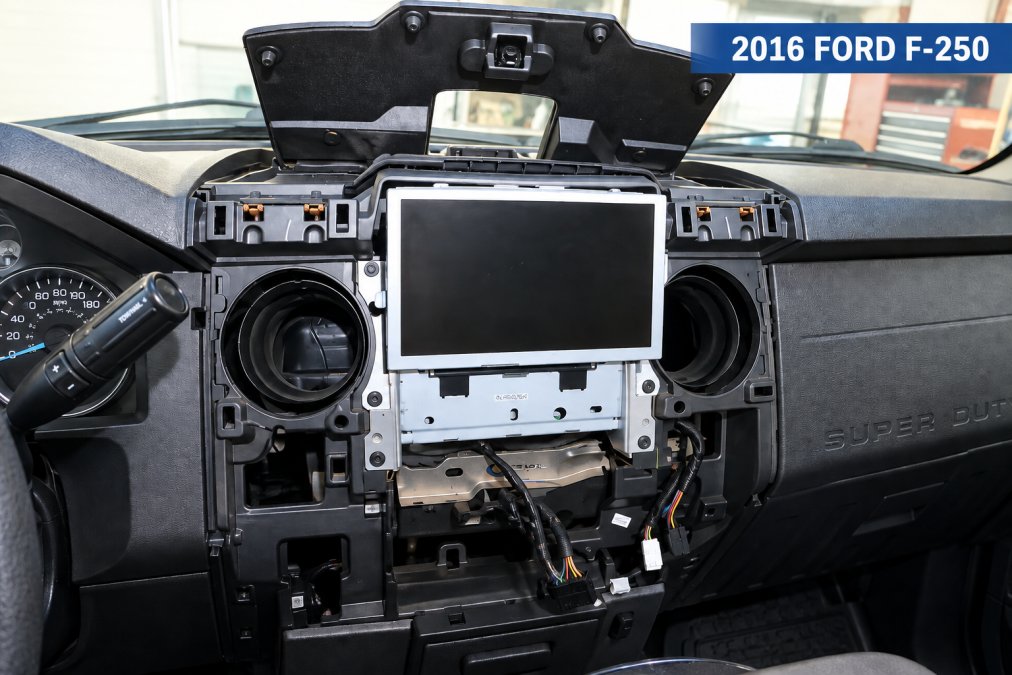
The APIM, or Accessory Protocol Interface Module, is the computer that runs SYNC. It is a small box mounted behind the touchscreen. Replacing it is the heart of any Ford SYNC APIM replacement guide.
APIM, Screen, and Media Hub: The Three Core Components
Three parts do most of the work in a SYNC 3 conversion.
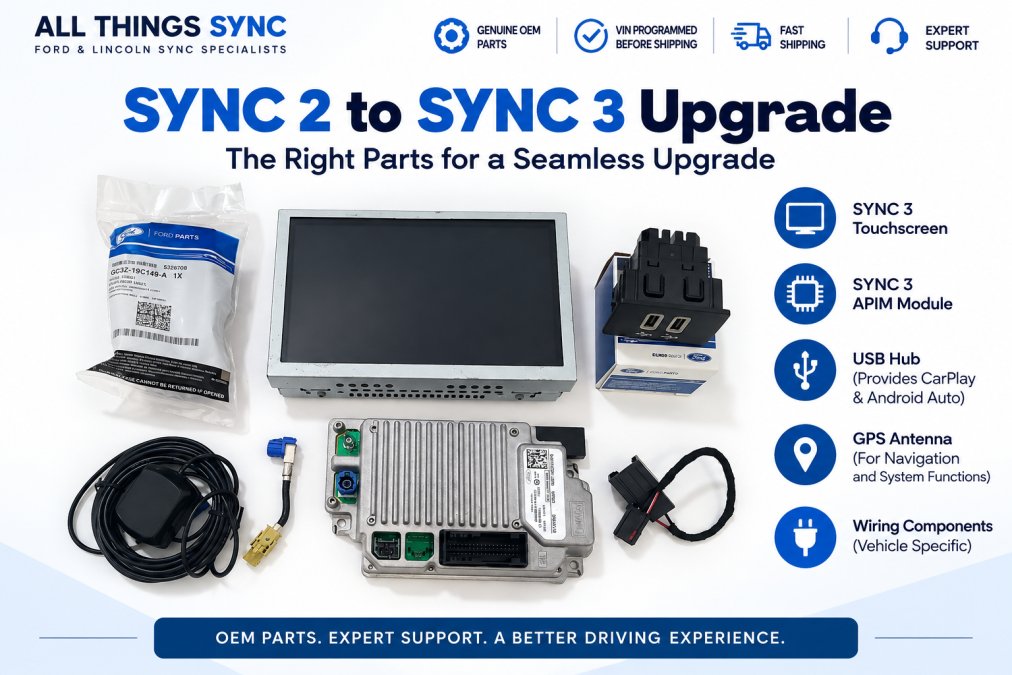
- APIM: the brain. It stores software, maps, and vehicle settings.
- Touchscreen: the display. It connects to the APIM with an LVDS cable.
- Media hub: the USB port that enables Apple CarPlay and Android Auto.
A common mistake is replacing only the screen when the APIM is the failing part.
Tools and Prerequisites for a Safe Removal
You need basic trim tools, not a full shop. A plastic panel pry set, a 7mm socket, and a clean workspace cover most jobs. Disconnect the battery before you pull connectors.
Benefits of VIN Programmed SYNC Modules for DIY Installers
VIN-programmed modules arrive ready to install, which removes the hardest part of the job. The seller loads your vehicle's configuration before shipping, so the unit talks to your car on first boot.
- No dealer visit for programming
- Factory features keep working
- Fewer diagnostic headaches after install
- Faster, cleaner first start
DIY SYNC 3 Installation Issues You Need to Plan For
DIY SYNC 3 installation issues can come from incorrect components, loose connections, incompatible media hubs, or incorrect APIM configuration. Planning for these before you start makes troubleshooting much easier.
The usual trouble spots:
- Media hub that does not support CarPlay or Android Auto
- Missing or wrong USB harness cable
- LVDS cable not fully seated, causing a blank screen
- Incorrect APIM configuration for the vehicle
- As-built data not written to the replacement module
Wiring Harness and Media Hub Compatibility
CarPlay and Android Auto need a hub that supports them. Older hubs do not. If you keep the old hub, your phone may charge but never connect.
Symptom-to-Component Quick Reference
When something goes wrong after the swap, several different components can produce similar symptoms. Use the table below as a starting point for troubleshooting, not a definitive diagnosis.
Symptom |
Possible Cause(s) |
First Check |
|---|---|---|
Intermittent on/off or flickering display |
Screen, LVDS cable connection, or ground issue |
Screen seating, screen ground, cable routing |
Touch does not respond, image is fine |
Digitizer in the screen |
Screen assembly |
Stuck on boot logo |
APIM, as-built data mismatch |
Hard reboot |
No power at all |
Power and connections |
Fuses, main harness connector, battery disconnect |
Phone charges but never connects |
Media hub |
Hub part number, USB harness |
Backup camera blank |
Wiring and APIM config |
Camera harness, as-built settings |
Hardware Compatibility: Which Ford and Lincoln Models Qualify
Compatibility depends on what your vehicle has now, not just its year. The cleanest upgrades start from a factory 8-inch SYNC 2 touchscreen.
Starting System |
Common Upgrade Path |
Key Requirement |
|---|---|---|
SYNC 2 / MyFord Touch, 8-inch screen |
Full SYNC 2 to SYNC 3 conversion (SYNC 3 APIM, SYNC 3 touchscreen, compatible USB media hub, wiring, and other vehicle-specific components) |
Components matched to your specific vehicle |
4-inch display with Bluetooth |
Custom harness and bezel |
|
Early SYNC 3 |
APIM replacement |
Correct VIN programming |
Warranty, Insurance, and Resale Value After a DIY Upgrade
A DIY upgrade can affect your factory warranty, and it can affect resale. Neither outcome is automatic, but both deserve a clear-eyed look.

FTC guidance on vehicle warranties and aftermarket parts
DIY vs Professional Installation: A Cost and Risk Comparison
DIY saves the labor cost, and a properly matched, VIN-programmed plug-and-play kit is designed to make the install straightforward. If you would rather not remove interior trim or connect automotive wiring yourself, professional installation is the more comfortable option. The trade-offs below can help you decide.
Factor |
DIY |
Professional |
|---|---|---|
Labor cost |
None |
Shop hourly rate |
Programming |
Pre-done by seller |
Handled by shop |
Long-term reliability |
Tracks install quality |
Tracks shop workmanship |
Best for |
Owners comfortable removing trim and connecting wiring |
Owners who'd rather not remove trim or connect wiring themselves |
A Practical Decision Framework
Ask yourself three questions before you choose a path:
- Can you identify the APIM, screen, and media hub by part number on your own vehicle?
- Are you comfortable disconnecting the battery and re-seating LVDS and USB connectors without forcing them?
- Do you have a plan for diagnosing a fault if the screen does not boot on first try?
Three yes answers point to DIY. Any no is a signal to pay for install or to buy a kit that arrives fully programmed so the software side is already handled.
Ford owner support and SYNC resources
Frequently Asked Questions
Is it possible to upgrade my Ford SYNC to SYNC 3?
Yes, if your vehicle has the factory 8-inch SYNC 2 touchscreen, a SYNC 3 upgrade is a direct hardware swap. The upgrade kit includes a genuine OEM SYNC 3 APIM, touchscreen, and the necessary wiring. The APIM is programmed to your VIN before shipping, so it integrates with your factory features like backup camera, steering-wheel controls, and climate settings. For vehicles with a 4-inch display, a full conversion kit is required, which adds a custom harness and mounting brackets.
What are the risks of performing a DIY SYNC hardware upgrade?
The main risks are physical damage during dashboard disassembly, connecting the wrong harness, or installing an APIM that isn't programmed for your VIN. A mismatched module can cause a blank screen, unresponsive touch controls, or error codes. Using a pre-programmed, VIN-matched APIM from a specialist eliminates the software risk and reduces the job to a plug-and-play hardware install. Always disconnect the battery before starting and work slowly to avoid breaking plastic clips.
Does a DIY SYNC upgrade void my vehicle warranty?
In the U.S., the Magnuson-Moss Warranty Act prevents a manufacturer from voiding your entire warranty just because you installed aftermarket parts. However, if a dealer can prove the aftermarket part caused a specific failure, they can deny coverage for that repair. Using genuine OEM components, like a VIN-programmed SYNC 3 APIM, keeps the system factory-correct and minimizes the chance of a warranty dispute.
Why is VIN programming necessary for a SYNC APIM replacement?
The APIM stores your vehicle's specific configuration, including audio settings, climate control, and driver-assist features. A generic or unprogrammed module won't communicate correctly with your car's network, leading to missing features or a non-functional screen. VIN programming loads your vehicle's exact as-built data into the module before shipping. This ensures that when you plug it in, features like backup camera, heated seats, and steering-wheel controls work immediately without a dealer visit.
A DIY SYNC upgrade is safe when the module is programmed to your VIN and the wiring is plug-and-play. A DIY SYNC upgrade can be straightforward with the correct vehicle-specific hardware, plug-and-play wiring, and a properly VIN-programmed APIM. All Things Sync ships genuine OEM components, VIN-programmed APIMs, and tested kits with a 1-year warranty and U.S.-based support. Get started with All Things Sync and add Apple CarPlay, Android Auto, and factory navigation to your Ford or Lincoln.