


Ford SYNC 2 to SYNC 3 Upgrade: What You Need to Know
Table of Contents
- How to Identify SYNC 2 vs SYNC 3 in Your Ford or Lincoln
- Why a SYNC 2 to SYNC 3 Upgrade Is a Hardware Conversion, Not a Software Update
- What Hardware Components Are Required for a SYNC 2 to SYNC 3 Upgrade
- VIN Programming for Ford Infotainment: Why It Matters
- Apple CarPlay and Android Auto for Ford: What Changes After the Upgrade
- Factory Navigation vs. Apple Maps, Google Maps, and Waze
- Can I Upgrade SYNC 2 to SYNC 3 Myself?
- Do I Need Dealer Programming?
- Is a SYNC 2 to SYNC 3 Upgrade Worth It?
- Frequently Asked Questions
Last Updated: September 21, 2026
How to Identify SYNC 2 vs SYNC 3 in Your Ford or Lincoln
The fastest way to tell which system you have is the screen layout and interface response. SYNC 2, also called MyFord Touch, uses a four-quadrant home screen with color-coded corners for Phone, Navigation, Entertainment, and Climate. SYNC 3 uses a simpler horizontal layout with large tiles and faster touch response.
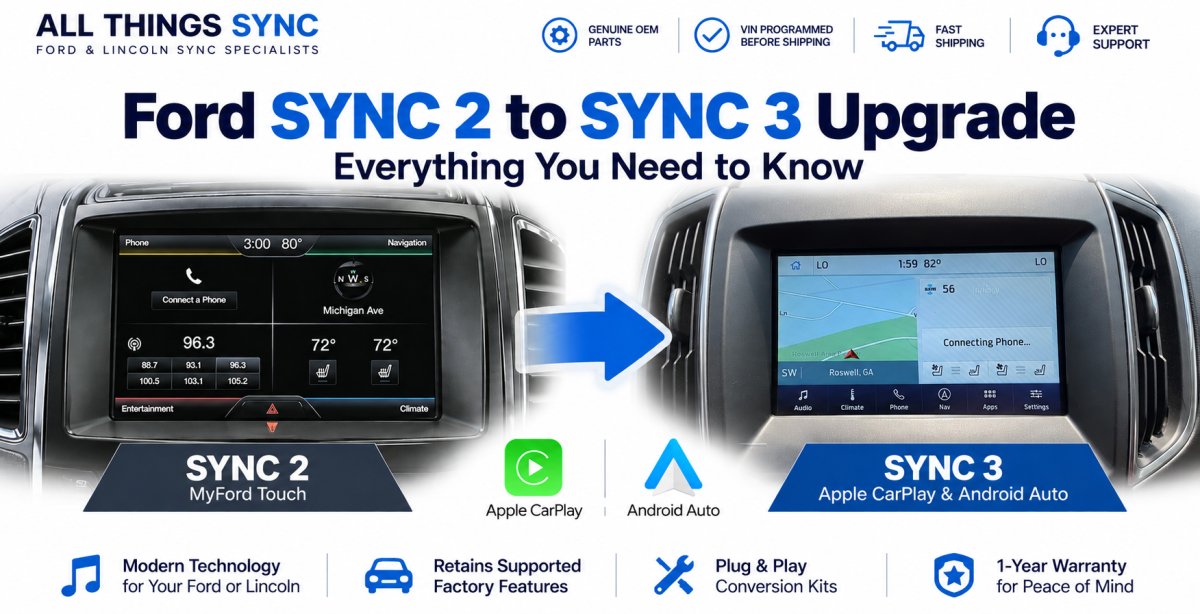
The clearest confirmation is the software itself: a four-quadrant home screen with color-coded corners means SYNC 2, while a horizontal layout of large tiles with quicker touch response means SYNC 3. Physical button count and layout below the screen are not a reliable way to tell them apart, since that varies by trim and model year.
This distinction decides the entire upgrade path, since mistaking one system for the other means ordering parts that will not talk to your vehicle.
Why a SYNC 2 to SYNC 3 Upgrade Is a Hardware Conversion, Not a Software Update
SYNC 2 cannot be updated into SYNC 3 with a download, a USB stick, or a dealership flash. The two systems run on different hardware, and the SYNC 3 APIM, the module that holds the operating system, is a physically different part.

This is the biggest misunderstanding owners have.
What Hardware Components Are Required for a SYNC 2 to SYNC 3 Upgrade
A complete conversion uses several components depending on your vehicle's factory configuration, including the SYNC 3 APIM and touchscreen, along with the required media hub, wiring, and other vehicle-specific components. A missing or mismatched component is the most common reason a swap boots but misbehaves.
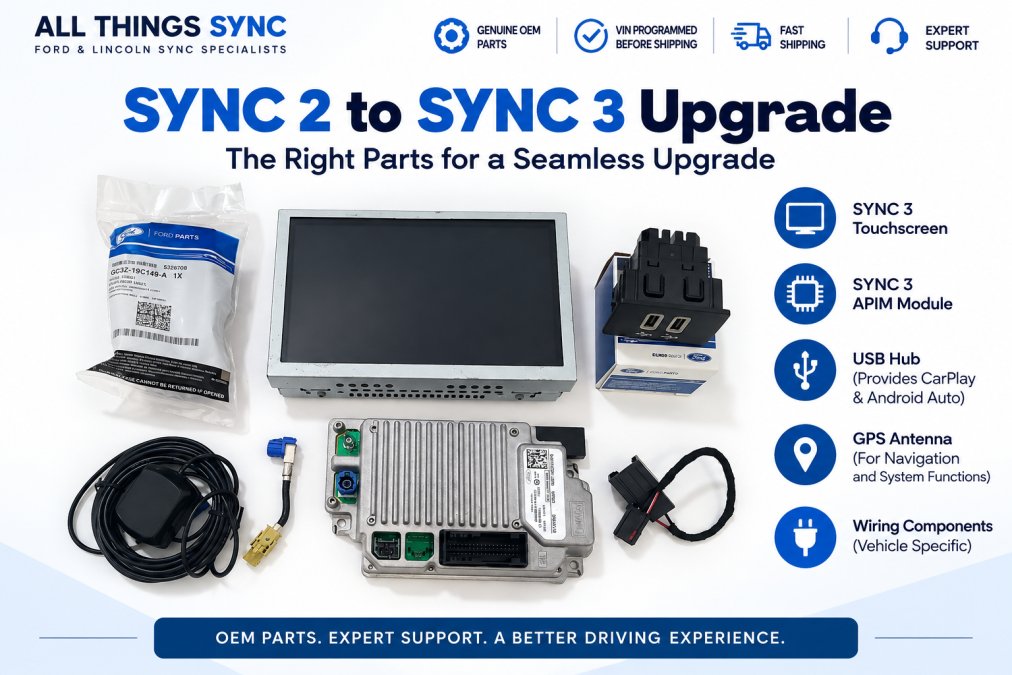
SYNC 3 APIM and Touchscreen
The APIM, short for Accessory Protocol Interface Module, is the computer. It holds the operating system, the vehicle configuration, and the logic that talks to the rest of the car over the CAN bus. The touchscreen is the display and input surface. The APIM, the touchscreen, and any supporting parts are separate components, and each one has to be compatible with your specific vehicle, so the safest approach is sourcing parts matched to your vehicle rather than assuming any APIM and screen combination will work together.
USB Hub, Wiring, and GPS Antenna
The media hub is the small module that adds the USB ports supporting Apple CarPlay and Android Auto. Whether your original hub needs to be replaced, and which hub and wiring your vehicle needs, depends on your vehicle's configuration and the CarPlay/Android Auto setup you want. GPS antenna needs are similarly vehicle- and system-dependent, since not every configuration uses the same antenna or position feed.
|
Component |
Purpose |
Needed When |
|---|---|---|
|
SYNC 3 APIM |
Runs the operating system and holds vehicle configuration |
Always |
|
Capacitive touchscreen |
Displays and accepts touch input |
Always |
|
Media hub |
Enables CarPlay and Android Auto |
Depends on vehicle and desired CarPlay/Android Auto setup |
|
GPS antenna |
Feeds factory navigation |
Vehicle- and system-dependent |
|
Wiring harness |
Connects old loom to new module |
Vehicle-dependent |
Why the Parts List Varies by Vehicle
Two vehicles that look identical on the lot can need different parts. Year, model, trim, and existing factory configuration all change what is already present and what has to be added. A vehicle that already has a backup camera and navigation needs fewer add-on parts than a base model, and the harness that bridges the old connectors to the new module is not the same across every platform.
VIN Programming for Ford Infotainment: Why It Matters
VIN programming means the SYNC 3 APIM is configured for your specific vehicle before it ships, rather than arriving as a blank module. Ford ties infotainment settings to the vehicle identification number, so an unconfigured module often boots but misbehaves.
Apple CarPlay and Android Auto for Ford: What Changes After the Upgrade
Apple CarPlay and Android Auto for Ford become available once compatible SYNC 3 hardware is installed and connected. Rather than simply mirroring your phone's screen, they give you a phone-integrated interface on the SYNC 3 touchscreen for supported apps, including maps, messaging, music, and calls.
FORD & LINCOLN SYNC 2 TO SYNC 3 UPGRADE →
Factory Navigation vs. Apple Maps, Google Maps, and Waze
Ford's factory navigation is built into the vehicle. Apple Maps, Google Maps, and Waze instead run through the phone connected via CarPlay or Android Auto, using whichever maps app you already have set up on your phone.
Can I Upgrade SYNC 2 to SYNC 3 Myself?
Yes, many owners complete the upgrade themselves, provided they are comfortable removing interior trim panels and following instructions carefully. The work is mechanical rather than exotic, but it rewards patience. Difficulty varies by vehicle: a straightforward swap on one model can involve more panel removal on another, and compatibility depends on year, model, trim, and existing factory equipment, so two trucks that look identical outside may need different parts inside.
What the Job Actually Involves
Installation normally involves replacing the SYNC 2 APIM and display along with the necessary supporting parts. Trim, connectors, and wiring vary by vehicle, so follow the vehicle-specific instructions included with your kit rather than a generic sequence.
Post-Installation Calibration and Checks
After the first boot, run through a short checklist to confirm everything carried over:
- Steering-wheel buttons: test volume, track skip, voice, and any media buttons to confirm they still talk to the new module.
- Audio: check that speakers, balance, and fade settings are correct.
- Phone pairing: pair a phone over Bluetooth and confirm calls and media play.
- Factory features: if your vehicle came with climate controls, a backup camera, or other features tied to the touchscreen, confirm they still display and respond correctly. What carries over depends on your vehicle's original equipment and how the new module is configured.
Safety and Warranty Considerations
Modifying the factory electrical system can affect electrical warranty coverage on the affected circuits, so check your warranty terms before you begin if the vehicle is still covered.
Why a Pre-Programmed Kit Changes the Difficulty
When the APIM arrives already configured for your VIN, the hardest part of the job, the programming, is done before the box reaches you. That turns a project that would otherwise require a dealer visit or a diagnostic tool into a plug-and-play hardware swap. The All Things Sync kit is built around that idea: the module is matched to your vehicle before shipping, so installation is mostly trim removal and connector work.
Do I Need Dealer Programming?
With a supported All Things Sync SYNC 2 to SYNC 3 upgrade kit, the APIM is configured for your vehicle before shipping, so a dealer visit for APIM programming is normally not required.
Is a SYNC 2 to SYNC 3 Upgrade Worth It?
For owners who plan to keep their vehicle, upgrading from SYNC 2 to SYNC 3 can provide a more modern interface and Apple CarPlay/Android Auto while retaining the factory-style appearance. Built-in Ford navigation is also available as an option for customers who want it.
Frequently Asked Questions
Can I convert my Ford SYNC 2 to SYNC 3?
Yes, if your vehicle has the factory 8-inch SYNC 2/MyFord Touch touchscreen. The conversion replaces the SYNC 2 APIM and display with genuine OEM SYNC 3 hardware, adds a compatible USB hub and wiring, and requires VIN programming so the system integrates with your vehicle. Vehicles with a 4-inch display follow a different conversion path. Check compatibility by year, model, and trim before ordering.
How much does a SYNC 2 to SYNC 3 upgrade cost?
Pricing depends on the kit and whether you choose built-in Ford navigation. See the All Things Sync SYNC 2 to SYNC 3 upgrade products for current pricing and available options. All Things Sync upgrade kits include genuine OEM hardware, VIN programming, and a 1-year warranty. The right choice depends on whether you want built-in navigation or prefer using Apple Maps, Google Maps, or Waze through CarPlay or Android Auto.
Will my factory features like backup camera and steering wheel controls work after the upgrade?
Supported factory features are retained when the correct parts and configuration are used. This includes the backup camera, steering-wheel controls, heated seat controls, factory climate controls, parking features, and factory audio controls. Because the SYNC 3 APIM is programmed to your VIN and factory configuration before shipping, no additional programming is normally required after installation.
Do I need to visit a dealership to program a new SYNC 3 system?
No. When you order from All Things Sync, the SYNC 3 APIM arrives pre-programmed to your vehicle's VIN and factory configuration. You install the hardware, and the system integrates with your vehicle without a dealer visit. This is a key difference from buying a used APIM from a salvage yard, which would require separate programming and may not match your vehicle's configuration.