


Ford SYNC 3 Screen Upgrade Kit: What to Know
Table of Contents
- Screen Replacement vs. Full SYNC 3 Upgrade
- What's Actually Inside a Complete Upgrade Kit
- Why VIN-Programmed SYNC 3 Modules Matter
- Which Ford SYNC 3 Upgrade Kit Do I Need?
- Ford SYNC 3 USB Hub Upgrade and CarPlay Setup
- SYNC 3 APIM Module Replacement
- Troubleshooting Ford SYNC 3 Black Screen Issues
- Common Buying Mistakes to Avoid
- Conclusion
- Frequently Asked Questions
Last Updated: September 22, 2026
Screen Replacement vs. Full SYNC 3 Upgrade
A Ford SYNC 3 screen upgrade kit solves two very different problems, and mixing them up is one of the most common mistakes buyers make. If your 8-inch display is cracked, delaminating, or ghost-touching, a screen swap restores what you already had. If you're starting from SYNC 2 with MyFord Touch, the screen alone changes nothing: you need the full conversion, including the APIM, media hub, and wiring.
This guide from All Things Sync breaks down what's actually in the box, which parts vary by vehicle, and how to avoid paying for hardware your truck or SUV can't use.
When a Screen Swap Is Enough
A screen-only replacement makes sense when the APIM is healthy and only the display has failed. Visible cracks, delamination, or a digitizer that stops responding to touch while the image still renders point toward the screen itself. Flickering, intermittent behavior, and a blank or black screen can come from more than one cause, so confirming which component has actually failed is worth doing before ordering parts.
When You Need the Complete Conversion
Vehicles running SYNC 2 or MyFord Touch cannot gain CarPlay or Android Auto from a screen swap. The SYNC 3 APIM is the computer that runs the newer interface, and the older module simply doesn't support it.
What's Actually Inside a Complete Upgrade Kit
Depending on the vehicle and starting configuration, a complete SYNC 3 conversion may include the SYNC 3 APIM, an 8-inch capacitive touchscreen, a media hub for CarPlay and Android Auto, USB and LVDS cables, and the mounting brackets needed for your vehicle. Exact contents shift with year, trim, and factory options, so two kits for the same model year can differ, and the only reliable way to know what your vehicle needs is to match the kit against your VIN, not the model year alone. If your vehicle originally offered factory navigation, ask about a SYNC 3 APIM with factory navigation so that feature carries over after the upgrade.
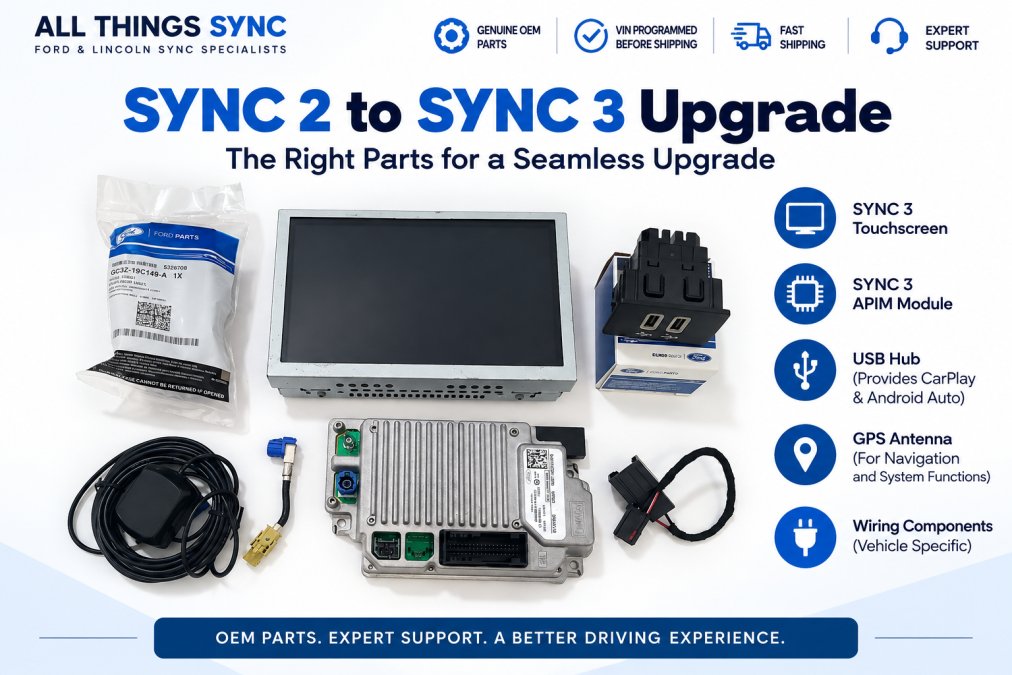
Components of a Ford sync 3 screen upgrade kit laid out on a workbench
The 8-Inch Touchscreen and Bezel
The display is a genuine OEM capacitive touchscreen, the same panel Ford installed in factory SYNC 3 vehicles. Capacitive glass responds to light touch rather than pressure, which is why it feels sharper than the resistive panel in older MyFord Touch systems.
Wiring, Mounting, and Media Hub Components
The USB media hub is what enables Apple CarPlay and Android Auto, and a conversion needs the media hub that's actually compatible with SYNC 3, not just any hub with a USB port. A conversion kit includes an OEM Ford media hub plus the USB harness cables that connect it. Whether your vehicle needs a single-port or dual-port hub, and whether the factory console opening accepts the new hub without modification, depends on your specific model and trim.
How to Verify a Kit Before You Buy
- Confirm the APIM is included and VIN-programmed. VIN programming configures the APIM for your vehicle's factory equipment and features, so the functions your vehicle supports actually work correctly. Some listings sell the screen alone and call it a "kit."
- Confirm the media hub and USB harness are included. CarPlay and Android Auto depend on both, and not every listing bundles them.
- Confirm the LVDS cable and mounting brackets match your vehicle. These are model-specific and easy to miss if you're not checking against your VIN.
- Confirm the seller will match parts to your VIN, not just your model year. Two vehicles of the same year can have different factory configurations.
A kit that lists every component but doesn't verify them against your VIN is a kit that may leave you sourcing missing parts after the box arrives. All Things Sync is a Ford and Lincoln SYNC specialist, in business since 2019, and builds each kit around your VIN with genuine OEM hardware so the APIM, hub, harness, and brackets arrive matched to your vehicle. APIMs come VIN-programmed, kits carry a 1-year warranty where applicable, and support is US-based.
Why VIN-Programmed SYNC 3 Modules Matter
A VIN-programmed SYNC 3 module is an APIM configured to your specific vehicle's identification number and factory build before it ships. That programming lets the module talk to your backup camera, steering-wheel controls, climate settings, and audio system the way the factory intended.
Which Ford SYNC 3 Upgrade Kit Do I Need?
Picking the right Ford SYNC 3 screen upgrade kit starts with knowing what your vehicle came with from the factory. There are three common starting points, and each one calls for a different kit:
- Factory SYNC 3 with an 8-inch screen already: you may only need a replacement screen or a VIN-programmed APIM, depending on which component failed.
- Factory 8-inch SYNC 2 or MyFord Touch: a screen alone will not give you SYNC 3. Moving up requires a complete SYNC 2 to SYNC 3 conversion, since the module, screen, and supporting hardware all change together.
- Factory 4-inch screen: you need a vehicle-specific 4-inch to 8-inch conversion kit, not the standard SYNC 2 to SYNC 3 kit, since the dash opening and mounting hardware differ.
If you're not sure which category applies to your vehicle, All Things Sync checks compatibility against your VIN before the order ships.
FORD & LINCOLN SYNC 2 TO SYNC 3 UPGRADE →
Ford SYNC 3 USB Hub Upgrade and CarPlay Setup
CarPlay and Android Auto depend on the media hub as much as the module. The Ford SYNC 3 USB hub upgrade replaces the older port assembly with an OEM Ford hub that supports smartphone integration, then connects through the included USB harness.
SYNC 3 APIM Module Replacement
SYNC 3 APIM module replacement means installing a genuine Ford APIM that has been VIN-programmed to your vehicle's factory build, including modules with factory navigation for vehicles that support it. All Things Sync sources OEM hardware and programs each module before it ships, so it talks to your backup camera, steering-wheel controls, and audio system the way Ford intended.
Troubleshooting Ford SYNC 3 Black Screen Issues
Troubleshooting Ford SYNC 3 black screen problems starts with identifying which component failed, because the fix differs for each cause. A dark display isn't automatically a dead screen, and it isn't automatically a dead module.
Some symptoms point toward a likely cause, but the same symptom can come from more than one source. Proper diagnosis matters before you order parts:
- Intermittent on/off or a flickering image: often points to the screen, though a loose connector or power issue can produce the same symptom.
- Touch stops responding but the image stays on: often related to the digitizer, but it can also be a software or connection issue.
- Stuck on the boot logo: can point to the APIM, but it isn't the only possible cause.
- No power at all: check fuses, connections, and the harness before replacing parts.
Common Buying Mistakes to Avoid
The most common buying mistake is ordering a screen when the module has failed. A new display on a dead APIM produces the same black screen you started with, because the APIM is the computer that drives the display, the screen is just the output. If you haven't diagnosed which component failed, start there before you buy anything.
Mistake 1: Buying by Model Year Instead of VIN
Two vehicles of the same year, make, and model can leave the factory with different infotainment configurations depending on trim and options. A module programmed for one build may power on in another but fail to talk to the backup camera, steering-wheel controls, or climate settings. The fix is to supply your VIN at checkout so the APIM is programmed to your specific build.
Mistake 2: Assuming "Plug-and-Play" Means No Programming
Many listings advertise plug-and-play, but an unprogrammed APIM still needs to be flashed to your vehicle before it will behave correctly. If the seller doesn't program it, you're either paying a shop to do it or hunting down the software and hardware to do it yourself. A genuinely plug-and-play kit arrives with the APIM already VIN-programmed.
Mistake 3: Skipping the Media Hub and USB Harness
CarPlay and Android Auto depend on the media hub as much as the APIM. Some kits sell the screen and module but leave out the hub and harness, which means smartphone integration won't work until you source those parts separately. Confirm the hub and harness are in the box before you order.
Mistake 4: Overlooking Model-Specific Caveats
A short conversation with our team before you order, with your VIN in hand, prevents many of these mistakes. All Things Sync has specialized in Ford and Lincoln SYNC upgrades since 2019, verifying every order against the vehicle's VIN and shipping genuine OEM, VIN-programmed hardware backed by US-based support and a 1-year warranty on applicable kits.
Conclusion
Choosing the right Ford SYNC 3 screen upgrade kit comes down to diagnosing the actual failure and matching the hardware to your VIN. A screen swap fixes a broken display; a complete conversion adds CarPlay, Android Auto, and optional factory navigation to vehicles still running SYNC 2.
Frequently Asked Questions
What is the difference between a SYNC 3 screen replacement and a full system upgrade?
A screen replacement swaps only the 8-inch touchscreen, which helps if your display is cracked or unresponsive but the APIM is fine. A full SYNC 3 upgrade replaces the APIM, touchscreen, USB hub, and required wiring. This is the route to take if you want Apple CarPlay, Android Auto, or factory navigation, since those features live in the APIM and media hub, not the screen alone.
Why is VIN programming required for a new SYNC 3 APIM?
The APIM stores vehicle-specific configuration data, including steering wheel controls, climate settings, backup camera, and audio behavior. A module programmed to your VIN arrives ready to integrate with those factory features. An unprogrammed module may power on but fail to communicate correctly with the rest of the vehicle, which is why VIN-programmed SYNC 3 modules are the safer choice for a plug-and-play install.
Does a SYNC 3 upgrade kit include Apple CarPlay and Android Auto?
Yes, when the kit includes the correct USB media hub and APIM. CarPlay and Android Auto run through the SYNC 3 APIM and require the updated USB hub to pass data from your phone to the screen. Kits that skip the hub may charge your phone but not launch CarPlay or Android Auto. Confirm the hub is included before ordering, since connectivity is vehicle- and setup-dependent.
What components are included in a complete SYNC 2 to SYNC 3 conversion kit?
Depending on the vehicle and starting configuration, a complete conversion may include the SYNC 3 APIM, an 8-inch capacitive touchscreen, a media hub for Apple CarPlay and Android Auto, USB harness cables, and an LVDS cable. Some kits also require a replacement radio bezel, mounting brackets, or other vehicle-specific components. Exact parts vary by vehicle year, trim, and factory equipment.
How do I ensure my SYNC 3 upgrade kit is compatible with my specific vehicle?
Start by confirming your vehicle currently has the factory 8-inch SYNC 2 or MyFord Touch system. Trucks with a 4-inch display need a different conversion kit with a custom wiring harness. Check that the kit is programmed to your VIN and lists your model year and trim. If you are unsure, contact the seller with your VIN before ordering to avoid return shipping and downtime.